
All-in-One System Computer: How It Works and How It Differs From a Traditional Desktop
Desktop computing environments increasingly demand compact, efficient hardware that minimizes clutter without compromising office throughput. Integrating the motherboard, processor, memory, and display panel into a single physical unit reshapes the traditional computing setup. Combining these components into one housing reduces external clutter across modern enterprise workstations.
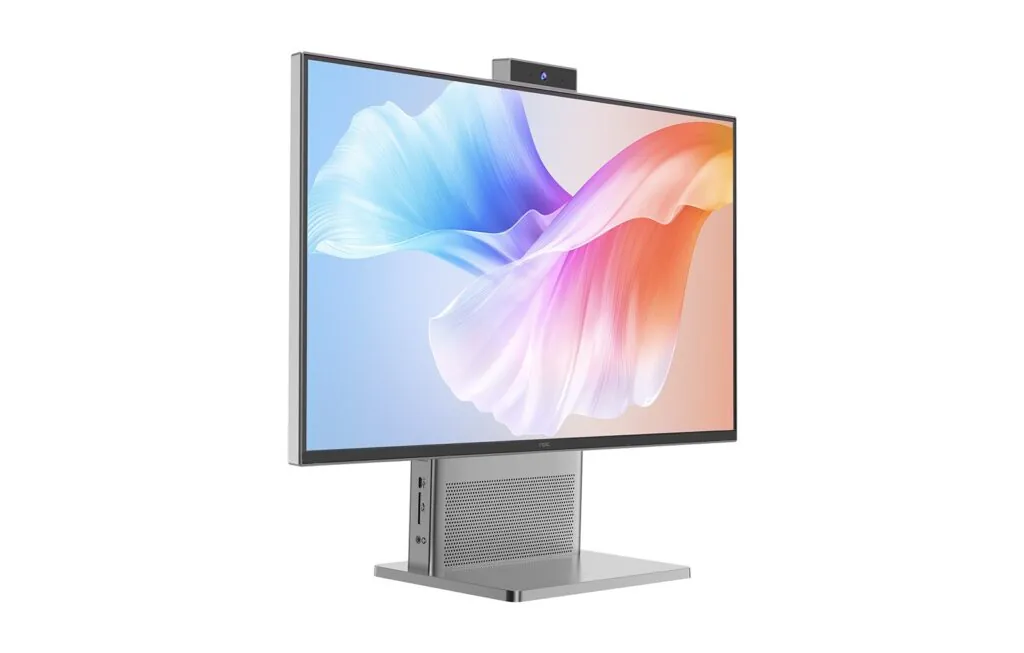
Traditional computing builds rely on distinct modular blocks: a heavy floor tower, an external monitor, standalone speakers, and an assortment of connecting cables. Adopting an all-in-one system computer replaces this fragmented hardware cluster by housing processing components directly behind the active screen glass.
Understanding how these machines operate internally clarifies how compact physical layouts contrast with traditional desktop configurations. Examining the differences across internal routing, workplace ergonomics, thermal dissipation, and serviceability helps commercial buyers make sound infrastructure investments.
Internal Mechanics: How Consolidated Systems Route Power and Data
Processing engines inside integrated units utilize specialized, low-profile mainboards manufactured to mount directly against the metal chassis of the display module. Rather than utilizing standard full-height motherboard layouts, engineers arrange voltage regulators, peripheral buses, and processing sockets across a flattened circuit board to conserve internal depth.
Power delivery enters through an external direct-current power supply unit, which steps down utility AC current prior to reaching the chassis. Removing the large internal power supply brick found in towers keeps the internal enclosure thin while minimizing localized electromagnetic interference near sensitive display circuitry.
Internal communication pathways link central silicon to the visual panel using direct Low-Voltage Differential Signaling or embedded DisplayPort ribbon cables. Direct wiring replaces external video cords and converts graphic frame buffers into active display images across the thin-film transistor liquid crystal matrix. Dedicated timing controllers synchronize pixel activation rates to maintain steady visual clarity.
Integrated peripheral assemblies—including stereo speakers, array microphones, wireless network antennas, and retractable cameras—connect directly to onboard header pins. Packaging these tools into the bezel frame avoids external accessories, creating a clean operational workstation ready for immediate tasks.
Workplace Deployment: Cable Mitigation and Spatial Footprint Contrasts
Space economy provides a prominent practical distinction between single-chassis designs and decentralized tower setups. Conventional towers demand dedicated floor pedestals or claim valuable desk surface, often gathering dust and obstructing leg movement beneath commercial workstations. Placing compute equipment directly behind screen glass frees valuable desk surface area for daily operations.
Cabling clutter represents another persistent challenge for standard configurations, which require multiple power lines, video connectors, speaker wires, and peripheral links. Deploying an all-in-one system computer condenses that wiring nest down to a single power cord plugged into an electrical outlet, simplifying office organization.
Administrative offices, educational computer labs, and healthcare check-in desks gain noticeable ergonomic improvements from consolidated hardware. Operators enjoy clear desk surfaces, while facilities teams experience faster station reconfigurations without sorting through tangled cord bundles behind desk partitions.
Structural support hardware often incorporates tilt, height, and swivel adjustments on the mounting stand, allowing users to adjust screen height easily. Standard VESA mounting patterns on the rear cover also enable wall mounting or articulated desk arm installations across space-constrained environments.
Thermal Dynamics: Enclosed Cooling Compared to Ventilated Towers
Heat dissipation represents a fundamental engineering divergence between slim enclosures and roomy computer cases. Traditional towers leverage wide interior cubic volume, large axial fans, and heavy heatsinks to dissipate heat from high-wattage components during prolonged workloads. Abundant internal space permits unrestricted convective airflow, keeping operational temperatures stable during intensive computing cycles.
Compact computing profiles restrict interior air circulation, necessitating thermal solutions similar to portable mobile workstations. Sintered copper heat pipes filled with phase-change working fluid transfer thermal energy away from the silicon die toward high-density aluminum fin stacks positioned along chassis edges.
Low-noise centrifugal fans pull intake air through discreet lower housing perforations, pushing heated exhaust out through upper ventilation channels. Efficient thermal management protects sensitive liquid crystal layers from excessive operating temperatures, preventing optical degradation over continuous daily operation.
Component power ratings reflect these physical packaging differences. Standard towers readily accommodate desktop processors running at high thermal design wattages, whereas integrated machines utilize energy-efficient mobile or desktop-class silicon rated between 15W and 65W to balance processing throughput with manageable thermal output.
Hardware Modularity: Component Expansion Versus Tower Flexibility
Serviceability highlights an important structural trade-off between unified systems and modular tower configurations. Full-size desktop towers accommodate multiple expansion cards, extra storage drive bays, and replaceable full-size power units over extended lifecycles.
Operating an all-in-one system computer involves modularity centered around accessible memory and storage slots rather than broad peripheral card expansion. Technicians access dual SO-DIMM RAM slots and M.2 NVMe solid-state storage bays by removing the back panel, allowing memory upgrades up to 64GB as system demands grow.
Routine component swaps remain straightforward for internal storage and memory, though upgrading the integrated display panel or core processor socket is typically restricted. Organizations balance this bounded modularity against the deployment speed, reduced footprint, and structural simplicity gained across workstation fleets.
Commercial Sourcing and Production Standards
Enterprise deployments require dependable hardware built to exacting quality standards. Established in 2005, NPC manufactures commercial display solutions and integrated computers for distribution partners worldwide, leveraging integrated supply chains, customizable motherboards supporting modern multi-core processors, Grade A panels, and flexible production order quantities.
Depending on NPC for reliable OEM and ODM production runs according to institutional requirements is possible because of their stringent ageing standards, electromagnetic compliance screening, and steady component procurement. Models in their hardware lines range from 21.5 inches to 27 inches in screen size and come with a variety of interface choices, ergonomic supports for installation, and warranties that last for two years.
If you are planning a corporate technology rollout and would want to discuss bulk pricing schedules, investigate bespoke hardware alternatives, or assess sample devices, contact NPC’s display and computer specialists.